
Download Swift Gum – AI Voice LinkedIn Outreach Tool
Overview
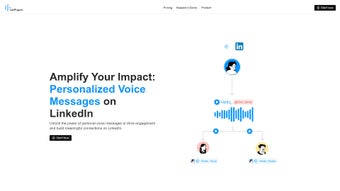
Swift Gum is a web‑based AI writing assistant that redefines the way sales professionals and recruiters approach LinkedIn outreach. By leveraging voice‑powered technology, Swift Gum lets users create personalized voice messages that can be recorded in their own voice or generated through AI‑assisted voice cloning. The platform’s intuitive interface streamlines the entire workflow: from drafting a compelling script to sending the final audio clip directly to a LinkedIn connection.
In addition to its core messaging capabilities, Swift Gum includes built‑in analytics that monitor open rates, listener engagement, and response trends. These insights empower users to refine their outreach strategy, test different voice tones, and ultimately boost response rates in a crowded inbox environment. While the tool is currently limited to LinkedIn and does not support multilingual text‑to‑speech, its unique focus on voice communication offers a fresh, human‑centric alternative to traditional text‑only outreach.
Whether you’re a sales executive looking to stand out, a recruiter aiming to build stronger candidate relationships, or a business development manager seeking higher conversion, Swift Gum provides a secure, easy‑to‑use solution that can be accessed from any modern browser without the need for additional software installations.
Key Features and Benefits
- Voice‑Powered Messaging: Record your own voice or use AI‑generated voice clones to send personalized audio clips.
- LinkedIn‑Only Focus: Direct integration with LinkedIn ensures messages are delivered to the right professional audience.
- AI Writing Assistant: Suggests concise scripts, calls‑to‑action, and tone adjustments to maximize impact.
- Analytics Dashboard: Real‑time metrics on message opens, listening duration, and reply rates.
- One‑Click Send: Seamlessly attach audio to LinkedIn messages without leaving the platform.
- Secure Cloud Storage: All voice files are encrypted and stored on secure servers compliant with GDPR.
- Free Trial & Affordable Plans: Start with a free trial, then choose from tiered pricing based on monthly voice minutes.
These features combine to create a compelling value proposition for anyone looking to break through the noise of text‑heavy inboxes. The AI writing assistant reduces the time spent crafting scripts, while the voice cloning option enables consistent branding without the need for professional recording equipment. Analytics empower data‑driven decisions, allowing you to test different voice styles and message lengths to see what resonates most with your target audience. Moreover, Swift Gum’s security measures ensure that sensitive sales pitches or recruitment offers remain confidential, a critical factor for businesses handling proprietary information.
Because the platform is web‑based, you can access it from any device with an internet connection—no downloads or installations required. This flexibility means you can record a quick voice note from a coffee shop, fine‑tune a script on your desktop, and send the final message directly from the browser, all within minutes. The result is a smoother, more human outreach process that can dramatically increase reply rates and shorten sales cycles.
Installation & Usage Guide
Getting started with Swift Gum is straightforward, thanks to its cloud‑native design. Follow these steps to set up your account and begin sending voice‑enhanced LinkedIn messages:
- Create an Account: Visit the official Swift Gum website and click “Sign Up.” Provide your name, professional email, and create a secure password. You’ll receive a verification link to activate your account.
- Connect LinkedIn: After logging in, navigate to the “Integrations” tab. Click “Connect LinkedIn” and authorize Swift Gum to access your LinkedIn connections. This single‑sign‑on process ensures your contact list is imported securely.
- Choose a Voice Option: In the “Voice Settings” section, select whether you’ll record your own voice or use an AI‑generated clone. For AI cloning, upload a short 30‑second sample of your voice; the system will generate a realistic voice model within minutes.
- Draft Your Message: Use the AI writing assistant to generate a concise script. Input key details like the prospect’s name, your value proposition, and a call‑to‑action. The assistant will suggest tone variations (professional, friendly, urgent) to match your brand voice.
- Record or Generate Audio: Click “Record” to capture your voice directly through the browser microphone, or select “Generate” to let the AI produce the audio using your cloned voice.
- Preview & Edit: Listen to the generated clip. If needed, use the built‑in editor to trim silence, adjust volume, or re‑record specific sections.
- Send via LinkedIn: Choose the LinkedIn contact(s) you wish to reach, attach the audio file, and click “Send.” Swift Gum automatically formats the message for optimal display on both desktop and mobile LinkedIn apps.
- Monitor Performance: Visit the “Analytics” dashboard to track open rates, listening duration, and reply statistics. Use these insights to refine future scripts and voice styles.
Swift Gum’s web interface is designed for speed; the entire workflow—from script creation to message dispatch—typically takes less than five minutes per prospect. The platform also supports bulk operations, allowing you to queue up multiple contacts and send personalized audio messages in batch mode, which is ideal for large outreach campaigns.
For teams, Swift Gum offers collaborative workspaces where multiple users can share scripts, voice models, and performance reports. Admins can assign roles, set usage limits, and monitor compliance with corporate outreach policies. This makes the tool suitable not only for individual sales reps but also for enterprise‑wide adoption.
Compatibility, Pros & Cons
Swift Gum is a cloud‑based service, which means it works on any operating system that supports a modern web browser. Whether you’re on Windows 10/11, macOS Monterey or later, Chrome OS, or even a Linux distribution, you can access the platform through Chrome, Edge, Firefox, or Safari. Mobile users on iOS 13+ or Android 9+ can also launch Swift Gum in their mobile browsers, though the full voice‑recording experience is optimized for desktop environments due to microphone permissions and screen real estate.
Pros
- Human‑Centric Outreach: Voice messages create a personal connection that text alone can’t achieve.
- AI‑Assisted Script Writing: Saves time and improves message quality.
- Analytics‑Driven Optimization: Real‑time insights help fine‑tune campaigns.
- Secure, GDPR‑Compliant Storage: Protects sensitive voice data.
- Cross‑Platform Accessibility: No downloads; works on any browser.
- Scalable for Teams: Collaborative workspaces and role‑based permissions.
Cons
- LinkedIn‑Only Limitation: Cannot be used for outreach on other platforms like email or WhatsApp.
- No Multilingual Support: Voice cloning is currently limited to the language of the uploaded sample.
- Lacks Text‑to‑Speech: Users must rely on voice cloning or manual recording.
- Browser Dependency: Requires a stable internet connection and compatible browser.
- Pricing Scales with Voice Minutes: Heavy users may incur higher monthly costs.
Overall, Swift Gum excels at delivering a unique, voice‑first outreach experience within the LinkedIn ecosystem. Its strengths lie in personalisation, data‑driven insights, and ease of access. The main drawbacks are its platform‑specific focus and the absence of multilingual capabilities, which may limit global outreach initiatives. However, for professionals whose primary prospecting channel is LinkedIn, the benefits far outweigh the constraints.
Frequently Asked Questions
Is Swift Gum free to use?
Swift Gum offers a 14‑day free trial that includes access to all core features and a limited amount of voice minutes. After the trial, you can choose from tiered subscription plans based on the number of voice minutes you need each month.
Can I use Swift Gum on my mobile device?
Yes. Swift Gum runs in any modern mobile browser on iOS and Android. However, the full voice‑recording and editing suite works best on desktop browsers where microphone permissions and screen space are optimal.
How secure is my voice data?
All audio files and user data are encrypted in transit (TLS) and at rest. Swift Gum complies with GDPR and ISO 27001 standards, ensuring that your proprietary sales pitches and recruitment messages remain confidential.
Can I clone my voice for future campaigns?
Yes. By uploading a short 30‑second voice sample, Swift Gum generates a realistic AI voice model that you can reuse across multiple messages, preserving brand consistency without re‑recording each time.
Does Swift Gum integrate with other CRM tools?
Currently, Swift Gum integrates directly only with LinkedIn. However, you can export analytics reports in CSV format and import them into popular CRMs like Salesforce, HubSpot, or Pipedrive for further analysis.
Conclusion & Call to Action
Swift Gum delivers a fresh, voice‑centric approach to LinkedIn outreach that can dramatically improve response rates and foster genuine connections. Its AI‑assisted script generation, seamless LinkedIn integration, and powerful analytics make it an indispensable tool for sales teams, recruiters, and business developers who want to stand out in a crowded inbox. While the platform is limited to LinkedIn and lacks multilingual support, the trade‑off is a highly focused solution that excels at what it does—turning your voice into a persuasive sales asset. Ready to transform your outreach strategy? Download Swift Gum today, start your free trial, and experience the power of voice‑first communication.



.png)



